


Lapalingo Login and Account Setup Guide
Setting up your account is quick, free, and built around a few clear steps. We’ll show you how to register, complete verification, use the Lapalingo login, and reset a password if you need to.
Getting Started with Your Lapalingo Account
Ready to join us? Lapalingo registration is free, and you must be at least 18 years old before you can play with real money.
We allow one account per person. You must register it yourself and use it only in your own name, so shared profiles, duplicate registrations, and accounts opened for someone else aren’t permitted.
Your account starts with accurate details. During registration, you’ll create your own password and provide the information we need to set up and verify your profile. Once you’ve completed the required steps and activated your account, you can access our game selection.
Step-by-Step Registration Process
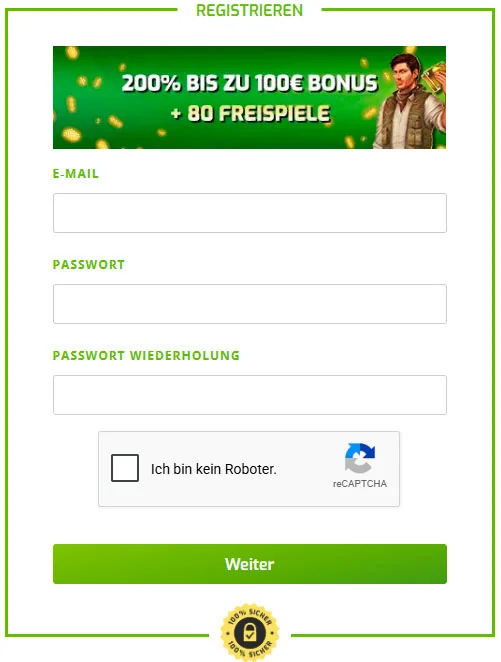
Here’s how the form works. You’ll move through several short screens, beginning with your contact details and then adding the personal information needed for your account.
Keep every entry accurate and make sure it matches your current identification document.
Entering Your Email and Password
Start with the details needed to create your account:
- Enter your email address.
- Choose a password.
- Repeat the password in the confirmation field.
- Tick the “I’m not a robot” checkbox.
- Select “Next” to continue to the following screen.
We recommend a password with at least eight characters, including uppercase and lowercase letters, numbers, and special characters. Keep it private, because a strong password helps protect your Lapalingo login.
Confirming Your Mobile Number
The second screen asks for your mobile number. The country calling code is preselected, so you only need to enter the remaining digits.
Select “Next” when the number is correct. Use “Back” if you need to return to the first screen and change your email address or password.
Completing Personal Details and Email Confirmation
Next, we’ll ask for the following details:
- Full name
- Date of birth
- Place of birth
- Residential address
- Nationality
These details must be correct and match your current identification document.
After you submit the form, we’ll send a confirmation email to the address you entered. Click the activation link in that email to open your Lapalingo account and access our game selection. If the message isn’t in your inbox, check your spam folder or request another activation email.
Identity Verification Requirements
Verification confirms that every Lapalingo profile belongs to the person who registered it and that the submitted profile details are correct. It helps us protect account access and keep the registration process reliable for you.
Automatic Identity Data Match
When you register at Lapalingo, you consent to the transfer of the personal details you provide to a third-party identity-verification database. That database compares the submitted information with its records and returns a match level as a percentage, which we use to verify Lapalingo account details.
This is an identity check, not a credit-rating check. Your creditworthiness is not assessed during the data match.
Camera-Based Identity Verification as a Backup
Sometimes an additional verification route is needed before we can complete profile activation. In that case, AutoIdent lets you confirm your identity through your smartphone camera or webcam.
You’ll scan the machine-readable part of a valid passport or national ID card. AutoIdent can also read additional document fields, check security features such as holograms, and finish with a short camera-based liveness check to confirm that a real person is completing the process.
Play Limits Before Full Verification
You can use our gaming offer for up to 72 hours after Lapalingo registration while full verification is still pending. During that initial period, total deposits are limited to €100.
Complete verification within those 72 hours to keep your profile ready for uninterrupted use. We may also require verification once your deposits reach €100, regardless of the number of individual payments.
Logging Into Your Account
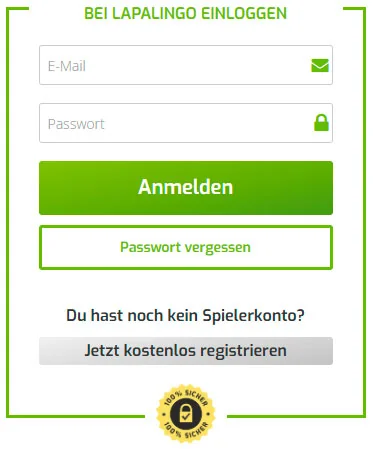
Once your profile is activated, you can sign in to Lapalingo through the standard login form or from a mobile device. Use the same account credentials across our available access options.
Standard Email and Password Login
Select “Log in” to open the Lapalingo login form. Enter the email address linked to your account and your password, then complete the sign-in process.
The form also includes a “Forgot password?” link if you can’t remember your password. If you’re new to Lapalingo, you’ll also see the option to register for a free account.
Recovering a Forgotten Password
Getting back into your profile takes only a few steps.
- Select “Forgot password?” on the Lapalingo Casino login form.
- Enter the email address you used for your Lapalingo account.
- Check your inbox for our password-reset email and follow the instructions to create a new password.
- Check your spam folder if the message isn’t visible in your main inbox.
Logging In on Mobile Devices and the App
You can use the Lapalingo Casino login through the Lapalingo app or our mobile-adaptive website. The Android app is available through Google Play, while the iOS app is available through the Apple App Store.
Our website adjusts to your phone’s screen and can be saved as a shortcut on your home screen. That gives you a direct route to your profile without taking up extra space on your device.
Keeping Your Account Secure
Your Lapalingo account is personal, so protecting your Lapalingo login details is your responsibility. Keep your email address and password private, and don’t give anyone else access to your profile.
Password Responsibility and Unauthorized Access
You’re responsible for keeping your login credentials secure and ensuring that no other person uses them. Activity completed with your credentials is treated as activity on your profile, whether or not you personally authorised that access.
If you believe your credentials may have been compromised, change your password immediately and let us know. We may temporarily block or close an account when we have reasonable grounds to suspect that its security has been affected or another person has accessed it.
Rules Against Shared or Duplicate Accounts
One person can register at Lapalingo and use one Lapalingo profile only. You must open the account yourself and use it exclusively in your own name.
The following account activities aren’t allowed:
- Selling your Lapalingo account to another person.
- Transferring account access or ownership.
- Buying, acquiring, or using another player’s account.
- Opening more than one profile for the same person.
- Registering or using an account on someone else’s behalf.
If you’re unsure whether you already have a profile, contact our customer service before attempting another Lapalingo registration.
Why Lapalingo's Sign Up Process Works for Players
Getting started is straightforward. You can register at Lapalingo for free, complete a short multi-screen form, and activate your account by confirming the link we send to your email address.
Our automated identity checks keep the next stage moving without turning account setup into a paperwork marathon. Once your account is activated, you can access our gaming offer and claim the welcome bonus available to new players.
FAQ
You Might Also Like

Lapalingo Mobile App: Play Licensed Slots on Any Device
Take Lapalingo with you and play licensed slots on your preferred mobile device. Our Lapalingo mobile casino experience gives you direct access to...
Lapalingo Bonus Codes
We offer three ways to unlock extra value at Lapalingo Casino: WELCOME for your first deposit, STAR20 for Starburst, and a €10 reward earned through...
Lapalingo No Deposit Bonuses: Daily Wheel Rewards, Points and Promo Codes
Lapalingo Casino provides several ways to unlock rewards without using a welcome offer. Our daily Wheel of Fortune, loyalty points shop, automatic...